Namespace
Namespaces are virtual clusters within a Kubernetes cluster which divides resources logically into groups. It helps organize and segreate resources.
The Namespace card displays all the namespaces within a cluster. Each namespace displays the following metric details as in the following screen.

| Resource | Description |
|---|---|
| Total pods | The number of pods that represent one or more containers and share resources. |
| Total Services | The number of services that expose an application running on a set of pods as a network service. |
| Total deployments | The number of deployments that manage the lifecycle of pods and replicasets. |
| Total statefulsets | The number of statefulsets which are a workload API object used to manage stateful applications. |
| Total daemonsets | The number of daemonsets that ensures a copy of a pod runs on each node in the cluster. |
| Status | The status of the namespace i.e. if it is actively running or not. |
Click View all in the Namespace card header to view all the available namespaces.
Multi-column Filter
Namespace
- Multi-column filter can be applied on numeric columns within the Namespace Table to refine the displayed data based on specific conditions.
- When the user clicks on the “Filter by” option, user can apply filter below numeric columns
| Column Name | Description |
|---|---|
| Total pods | Total number of pods running within the namespace. |
| Total services | Total number of services configured in the namespace. |
| Total deployments | Total number of deployments defined within the namespace. |
| Total statefulsets | Total number of StatefulSets in the namespace. |
| Total daemonsets | Total number of DaemonSets in the namespace. |
- Each filter condition is applied using the below operators and value ( user input based on the unit)
| Operator |
|---|
| Greater than |
| Less than |
| Equals |
| Greater than or equals |
| Less than or equals |
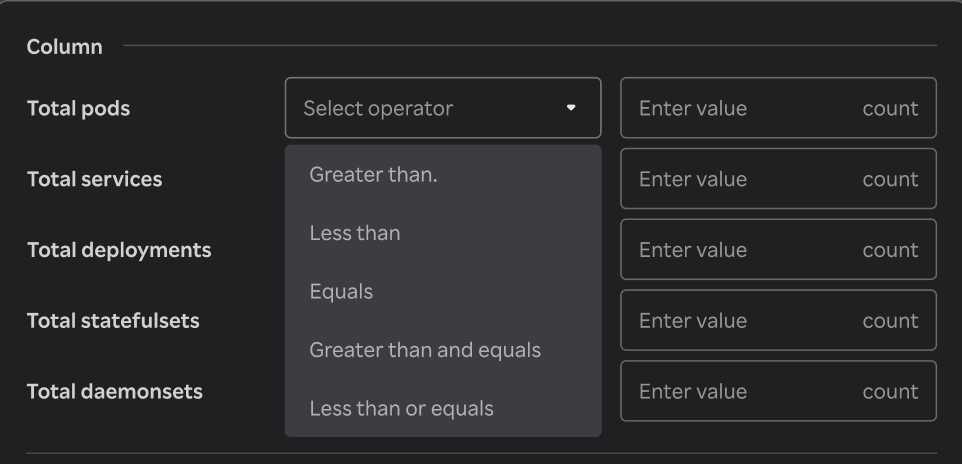
- Once filters & conditions are applied save button is enabled & click "Save" to apply the filter.
- Once filters & conditions are applied it displays no. of filters are applied.
note
- Filters are applied using AND logic — all specified conditions must be met for a record to be displayed.
- Only numeric columns support filtering; non-numeric fields (e.g., text or categorical values) are excluded from the filter options.
- If no records match the selected filters, the table will display a message such as “No data".
- The multi-column filter state persists until the user clears filters by clicking on "Clear" button when Filter by button is clicked.
- A "Reset" button is available to clear all applied filters and restore the table to its original, unfiltered state. This button is enabled only when one or more filters are currently applied.
